Git repo
Geometry
To find a mathematical description of what a crater should be, let's take a look at this spherical coordinate system:
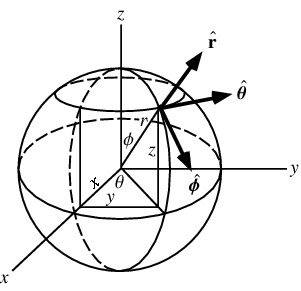
The distance between a point and the center of the circle is defined by:


What I've described so far only works for circles centered around the z axis. If it has to work for any circle centered around an axis (φ,θ), then a change of basis is required. Because this change is only defined by two rotations, it can be easily done using quaternions. Now, explaining how quaternions work and how are they defined isn't the object of this post and there are many great articles about them on the internet. Basically, quaternions are mathematical objects that represent the transformation induced by a rotation. For example, a rotation of α around an axis u can be expressed with the following quaternion:


Probability distributions
As for the radius, several papers have been written describing the distribution of crater sizes on the Moon and on Mars. Essentially, they showed that, the bigger a crater is, the less likely it is to exist. Instead of coding the distribution that's described in the aforementioned paper, I decided to use the gamma distribution, which comes with Python's random library:


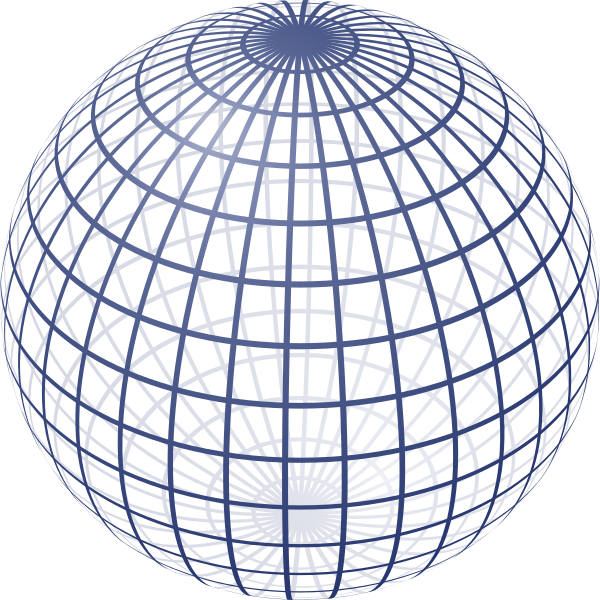
Because of the nature of the sphere's parametrization, points near the poles are simply more likely to get randomly chosen. This problem is better explained on Wolfram's page, which also offers a solution:

Blending with the terrain

I decided to give it an elevated rim by changing the sign of the function for high ρ/r values. In terms of code I start by finding the closest vertex to the crater's center and its height becomes a reference for the entire crater (gray horizontal line on the drawing). It means that terrain heights outside the crater isn't taken into account, which can create some very unnatural geometry:

To fix this, the crater needs to be blended into the terrain. At the edge of the crater (ρ=r) the natural terrain height is the boundary condition, then it blends into the elevated part of the crater (ρ=0.9r). Also, the inner part of the crater takes into account a fraction of the original terrain height because real craters are not perfectly smooth.
This is a planet I generated which is supposed to look at the Moon:

I feel like the result is a little disappointing but that's a consequence of choosing colors based on heights instead of using textures. Actually, what makes a crater look like a crater, and you can see it well on the moon photo, are the lighting conditions and, in particular, the shadows inside the crater.
Improving performance
Earlier in this post I mentioned that all of the vertices were filtered to see which ones are inside of a crater. This is very inefficient and makes generating craters awfully slow. Since we know the crater center's angular position (φ,θ) and its radius r, we can calculate angular bounds within which the crater is confined. Here's a 3D illustration I made with GeoGebra:

Let γ be the circle's angular radius and β the angle between a meridian tangent to the circle and its center. Here's a beautiful figure made with sketchometry:

We can already notice that all the vertices (φ,θ) inside the circle verify:

An analogous inequality could be written for θ.
Now, γ is only a function of r but β is a function of r and φc.
β is defined for φ∈[γ,π-γ] and r < R. To find its expression it's a good idea to fix one variable and vary the other.

With a little imagination you can guess that:

Closing words
Hope you enjoyed this post, stay tuned!

No comments:
Post a Comment